程序是在“内存”里跑的,所以永远以内存为原点。
参照物:程序/内存
Input (输入):数据从硬盘/网络 流进 内存。—— 读(Read)
Output (输出):数据从内存 流出 到硬盘/网络。—— 写(Write)
| 维度 | 字节流 (万能,图片/视频/文本) | 字符流 (仅限纯文本,自带编码) |
|---|---|---|
| 输入 (Read) | InputStream | Reader |
| 输出 (Write) | OutputStream | Writer |
字节流
FileOutputStream
- 操作本地文件的字节输出流,可以把程序中的数据写到本地文件中
核心步骤:
创建对象:
FileOutputStream fos = new FileOutputStream("a.txt");- 细节1:如果文件不存在,会自动创建,但是要保证父级路径是存在的。
- 细节2:如果文件存在,会清空原内容
写出数据:
fos.write(97);// 写出的是 ASCII 码,文件中显示 ‘a’。释放资源:
fos.close();// 极其重要! 不关流,文件会被程序锁死。
写出数据的三种方式
| 方法名 | 说明 | 适用场景 |
|---|---|---|
write(int b) | 一次写一个字节 | 极少用,效率太低 |
write(byte[] b) | 一次写一个字节数组 | 常用,适合写出大量数据 |
write(byte[] b, off, len) off:offset | 写出数组的一部分 | 最常用,配合循环读取时能精确控制写出的量 |
FileOutputStream写数据的问题
换行
Windows:
\r\n 回车 + 换行,java在底层会补全Linux/Unix:
\nMac:
\r
System.lineSeparator() 获取操作系统的换行符
续写
public FileOutputStream(File file, boolean append) true则续写
FileInputStream
功能:硬盘 $\rightarrow$ 内存 (读取字节)。
结束标志:读取到
-1。性能优化:定义
byte[]数组作为缓冲区,一次读取多个字节。适用场景:文件拷贝(图片、音视频)、不需要处理文本内容的场景。
核心步骤:
创建对象:
FileIutputStream fis = new FileIutputStream("a.txt");- 细节1:如果文件不存在,会直接报错
读取数据:
int b = fis.read(97);// 读出的是 ASCII 码,读出来显示 ‘a’。- 细节1: 读到文件末尾,
read返回-1
- 细节1: 读到文件末尾,
释放资源:
fis.close();
读入数据的方法
| 方法名 | 返回值类型 | 含义 |
|---|---|---|
read() | int | 读取一个字节(效率低),返回该字节的值;读完返回 -1 |
read(byte[] buffer) | int | 读取字节填充进数组,返回实际读取个数;读完返回 -1 |
available() | int | 返回文件剩余的可读字节数(慎用,大文件会爆内存) |
文件拷贝
	FileInputStream fis = new FileInputStream(PATH+"b.txt");
	FileOutputStream fos = new FileOutputStream(PATH+"copy.txt");
	byte[] buffer = new byte[1024];//1KB
	int len;
	while ((len = (fis.read(buffer))) != -1) {
	    fos.write(buffer, 0, len);
	}
	fos.close();
	fis.close();
[!NOTE]
close关闭顺序:先开的后关,后开的先关
异常处理try-with-resources
try-catch-finally
finally代码块一定会执行,除非虚拟机退出
当流对象实现了AutoCloseable接口时,可以使用小括号
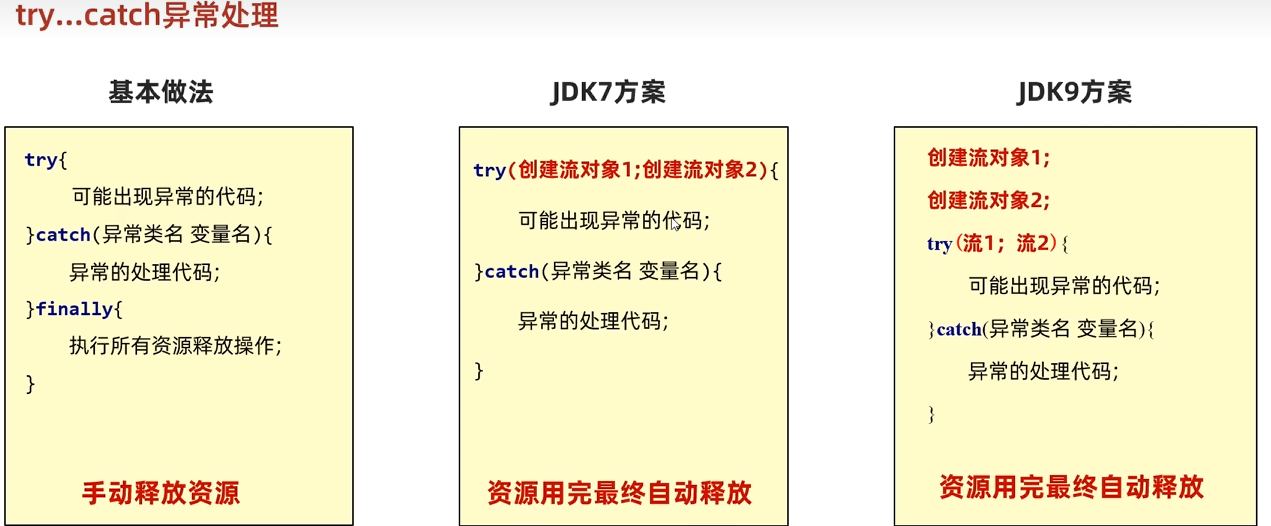
修正后的文件拷贝
	FileInputStream fis = new FileInputStream(PATH + "b.txt");
	FileOutputStream fos = new FileOutputStream(PATH + "copy.txt");

	try (fis;fos){
	    byte[] buffer = new byte[1024];//1KB
	    int len;
	    while ((len = (fis.read(buffer))) != -1) {
	        fos.write(buffer, 0, len);
	    }
	} catch (IOException e) {
	    e.printStackTrace();
	}
字符集
| 编码格式 | 中文占位 | 字节流读取过程 | 结果 |
|---|---|---|---|
| GBK | 2 字节 | fis.read() 一次拿 1 字节 | 拿到了半个字 $\rightarrow$ 乱码 |
| UTF-8 | 3 字节 | fis.read() 一次拿 1 字节 | 拿到了三分之一个字 $\rightarrow$ 乱码 |
字符流 = 字节流 + 字符集
| 特性 | 字节流 (Stream) | 字符流 (Reader/Writer) |
|---|---|---|
| 数据单位 | 字节 (8 bit) | 字符 (16 bit) |
| 处理对象 | 所有文件(图片、视频、文本) | 仅限纯文本(txt, java, html) |
| 读中文 | 会乱码 | 不会乱码 |
| 拷贝图片 | 完美拷贝 | 文件会损坏(千万别用字符流拷图片) |
核心步骤:
创建对象:
FileReader fr = new FileReader("a.txt");- _细节_1:
读取数据:
while((ch = fr.read() )!= -1){}细节1:按字节读取,遇到中文,一次会读多个字节,读取后解码。返回整数
细节2:读到文件末尾返回
-1read()的细节:- 在读取之后,方法的底层还会进行解码并转成十进制,最终会把这个十进制作为返回值,这个十进制的数据也表示在字符集上的数字。
释放资源:
fr.close();
缓冲流
	IO流体系
	├─ 字节流
	│  ├─ InputStream(字节输入流)
	│  │  ├─ FileInputStream(基本字节输入流)
	│  │  └─ BufferedInputStream(字节缓冲输入流)
	│  └─ OutputStream(字节输出流)
	│     ├─ FileOutputStream(基本字节输出流)
	│     └─ BufferedOutputStream(字节缓冲输出流)
	└─ 字符流
	   ├─ Reader(字符输入流)
	   │  ├─ FileReader(基本字符输入流)
	   │  └─ BufferedReader(字符缓冲输入流)
	   └─ Writer(字符输出流)
	      ├─ FileWriter(基本字符输出流)
	      └─ BufferedWriter(字符缓冲输出流)
1.为什么它快?
普通流:每读写一个字节,就要调用一次操作系统的 API,直接操作硬盘。硬盘 IO 是计算机最慢的操作。
缓冲流:在内存中开辟了一个 8KB (8192 byte) 的字节数组(缓冲区)。
输入缓冲:一次性从硬盘读 8KB 进来,你调
read()时,它是从内存数组里拿。输出缓冲:你调
write()时,数据先存在内存数组里,攒满 8KB 后,一次性“喷”向硬盘。
2.家族结构与包装模式
- 缓冲流属于装饰者模式(Decorator Pattern),它不具备读写文件的能力,必须依托于“基本流”。
语法模板:
// “套娃”式创建:外层关了,内层自动关
	BufferedInputStream bis = new BufferedInputStream(new FileInputStream("a.mp4"));
| 类型 | 缓冲流名称 | 包装的基本流 |
|---|---|---|
| 字节输入 | BufferedInputStream | FileInputStream |
| 字节输出 | BufferedOutputStream | FileOutputStream |
| 字符输入 | BufferedReader | FileReader |
| 字符输出 | BufferedWriter | FileWriter |
字符缓冲流的特殊方法
① BufferedReader -> readLine()
功能:读取一整行,直到遇到换行符(
\r或\n)。返回值:返回
String。注意:不包含换行符本身。结束标志:读到文件末尾返回
null(注意:不再是 -1)。
② BufferedWriter -> newLine()
功能:写出一个换行符。
优势:跨平台性。它会根据当前操作系统自动切换
\r\n(Win) 或\n(Linux)。
性能对比
| 方式 | 性能 | 评价 |
|---|---|---|
| 基本流 + 单字节 | 极慢 | 可能需要几分钟 |
| 基本流 + 数组 (8KB) | 快 | 常用,性能已经很好了 |
| 缓冲流 + 单字节 | 快 | 缓冲流弥补了单字节的频繁 IO |
| 缓冲流 + 数组 (8KB) | 极快 | 推荐使用 |
[!WARNING] 1.缓冲区溢出:输出流写完后,如果程序突然崩溃且没关流,缓冲区里没满 8KB 的那部分数据会丢失。所以必须
close()2.刷新缓冲区:
flush()只能清空缓冲区(强制写出),close()会先调flush()再关流3.内存占用:虽然缓冲流快,但每个流都会占 8KB 内存。如果同时开启几万个流,要注意内存溢出
带缓冲的字符流读取模板
	try (BufferedReader br = new BufferedReader(new FileReader("config.txt"));
	     BufferedWriter bw = new BufferedWriter(new FileWriter("copy.txt"))) {

	    String line;
	    // 1. 读一行
	    while ((line = br.readLine()) != null) {
	        // 2. 写一行
	        bw.write(line);
	        // 3. 必须手动补换行,因为 readLine 不读换行符
	        bw.newLine();
	    }
	} catch (IOException e) {
	    e.printStackTrace();
	}
转换流
| 转换流名称 | 构造参数 | 作用方向 | 常用场景 |
|---|---|---|---|
InputStreamReader | InputStream, Charset | 字节 $\rightarrow$ 字符 (解码) | 读取非 UTF-8 编码的文本文件 |
OutputStreamWriter | OutputStream, Charset | 字符 $\rightarrow$ 字节 (编码) | 将文本以指定编码存入文件(如存为 GBK) |
JDK11以后
// 底层其实就是封装了转换流
FileReader fr = new FileReader("gbk_file.txt", Charset.forName("GBK"));
BufferedReader br = new BufferedReader(fr);
如何实现字节流读一整行不出现乱码? 字节流 -> 字符流(可以指定编码) -> 字符缓冲流(可以读一整行)
	//1. 创建文件字节输入流
	FileInputStream fis = new FileInputStream(PATH + "d.txt");
	// 2. 将字节流包装为字符流(默认使用系统编码)
	InputStreamReader isr = new InputStreamReader(fis);
	//3. 将字符流包装为缓冲字符流,可以按行读取提高效率
	BufferedReader br = new BufferedReader(isr);

	System.out.println(br.readLine());
	br.close();//关闭高级流
序列化流/对象操作流
| 维度 | ObjectOutputStream | ObjectInputStream |
|---|---|---|
| 动作 | 序列化 (Serialization) | 反序列化 (Deserialization) |
| 方向 | 内存 $\rightarrow$ 硬盘 | 硬盘 $\rightarrow$ 内存 |
| 构造方法 | oos(OutputStream out) | ois(InputStream in) |
| 方法 | writeObject(Object obj) | readObject() |
| 前提条件 | Javabean必须实现 Serializable接口 | 类路径必须存在,ID 必须匹配 |
	//前提:实现Serializable(标记性)接口
	Student stu = new Student("张三", 20);
	ObjectOutputStream oos = new ObjectOutputStream(new FileOutputStream(PATH+"student.txt"));

	oos.writeObject(stu);
	oos.close();
	//--------------------------------------------//
	ObjectInputStream ois = new ObjectInputStream(new FileInputStream(PATH+"student.txt"));

	System.out.println(ois.readObject());
	ois.close();
细节一:serialVersionUID (版本号)
当你序列化一个对象后,如果修改了类的代码(比如加了个字段),再进行反序列化就会报 InvalidClassException。
解决:手动给类加一个固定的 ID。
private static final long serialVersionUID = 1L;这样即使类改了,只要 ID 没变,Java 就会认为它们是同一个类。
细节二:transient (瞬态关键字)
如果你不希望某个成员变量被保存到硬盘(比如用户的密码),只需在变量前加 transient。
private transient String password;反序列化回来后,该字段会变成默认值(如
null)。
细节三:
- 序列化时写入什么类型,反序列化时就必须用什么类型接收,类型必须完全一致。
	Student s1 =  new Student("张三",23,"南京");
	Student s2 =  new Student("李四",22,"重庆");
	Student s3 =  new Student("王五",24,"上海");

	ArrayList<Student> list = new ArrayList<>();
	list.add(s1);  list.add(s2);  list.add(s3);
	ObjectOutputStream oos = new ObjectOutputStream(new FileOutputStream(PATH+"student.txt"));
	//序列化使用Array List写入
	oos.writeObject(list);
	oos.close();

	//---------反序列化---------//
	ObjectInputStream ois = new ObjectInputStream(new FileInputStream(PATH+"student.txt"));
	//同样使用ArrayList反序列化
	ArrayList<Student> list =(ArrayList<Student>)ois.readObject();
	for (Student s : list) {
	    System.out.println(s);
	}
	ois.close();
打印流
地位:最方便的只写流。
三大招:
println():写啥都行,写完换行。printf():格式化打印(如保留两位小数% .2f)。System.setOut():重定向输出。
注意:
打印流只有输出,没有输入。
它是对其他输出流的包装,可以配合缓冲流一起用:
new PrintWriter(new BufferedWriter(new FileWriter("a.txt")))。
| 类别 | 名 称 | 对应家族 | 常用场景 |
|---|---|---|---|
| 字节打印流 | PrintStream | OutputStream | 标准输出(控制台)、日志记录 |
| 字符打印流 | PrintWriter | Writer | 网页响应 (Servlet)、文本写入 |
字节打印流
	PrintStream ps = new PrintStream(new FileOutputStream(PATH + "c.txt"),true,Charset.forName("UTF-8"));
	ps.println(97);//写出 + 自动刷新 + 自动换行
	ps.printf("%s+%s = %s",1,1,2);
	ps.close();
字符打印流
	PrintWriter pw = new PrintWriter(new FileWriter(PATH+"c.txt"), true);
	pw.println("你好");
	pw.close();
核心区别
| 维度 | 字节打印流 (PrintStream) | 字符打印流 (PrintWriter) |
|---|---|---|
| 所属家族 | OutputStream 的子类 | Writer 的子类 |
| 处理单位 | 字节(即使你传的是字符,它也会先转成字节) | 字符(直接按字符处理) |
| 内部缓冲区 | 没有(它直接调底层的 OutputStream) | 有(它内部维护了一个字符缓冲区) |
| 自动刷新 (AutoFlush) | 只要调了 println 就会自动刷新 | 必须在构造器手动开启 true 才会自动刷新 |
| 主要用途 | 标准输出 (System.out)、写原始字节数据 | 写纯文本、Web 开发 (Servlet 响应) |
标准输出流 (System.out)
本质:一个预定义的
PrintStream对象。特点:
随 JVM 启动而产生,随 JVM 关闭而销毁。
专门用于向控制台输出数据。
核心功能:
print()/println():万能打印。printf():格式化打印(如%d,%f)。System.setOut(PrintStream):修改输出目的地(常用于写简单的日志工具)。
解压缩流/压缩流
	InputStream(字节输入流)-> 解压缩流
	OutputStream(字节输出流)-> 压缩流
解压
什么是 ZipEntry?
一个 ZIP 文件就像一个大包裹,里面的每个文件或文件夹都是一个
ZipEntry。解压过程:就是通过
getNextEntry()方法,一个一个地把包裹里的东西(Entry)拿出来,然后用普通的字节流(FileOutputStream)把它们写到本地。
public static void unzip(File src,File dest) throws IOException {
    ZipInputStream zip = new ZipInputStream(new FileInputStream(src));
    ZipEntry entry;
    while ((entry = zip.getNextEntry()) != null) {

        if(entry.isDirectory()){
            File f = new File(dest,entry.getName());
            f.mkdirs();
        }else{
            FileOutputStream fos = new FileOutputStream(new File(dest,entry.getName()));
            int b;
            while((b =  zip.read()) != -1){
                fos.write(b);
            }
            fos.close();
            zip.closeEntry();//表示在压缩包中的一个文件处理完毕了
        }
    }
    zip.close();
}